

⚡ Quick Answer
If your vape cart isn’t hitting, the problem is usually dirty connections, incorrect voltage, or a dead battery. Here’s what to try first:
- Clean the connections: Use isopropyl alcohol and a cotton swab to clean both the battery’s 510-thread connector and the cartridge’s contact point.
- Check your battery charge: Plug it in for at least 30 minutes and look for a solid light indicating full charge.
- Adjust voltage: Start at 2.8V and adjust up or down. Most carts work best between 2.4V-3.3V.
- Test with another cart: If available, try a different cartridge on your battery to identify whether the cart or battery is the problem.
Still not working? Follow the complete troubleshooting guide below to diagnose and fix the issue in under 5 minutes.
Understanding Why Your Cart Won’t Hit
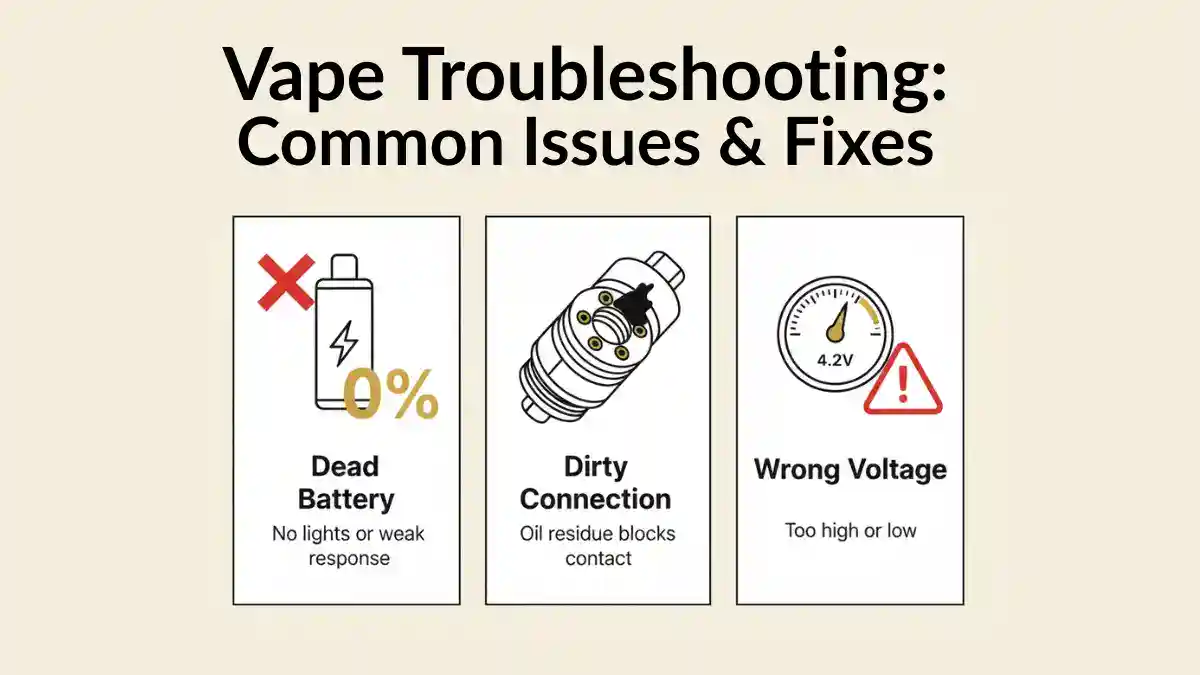
There’s nothing more frustrating than screwing in your cart, pressing the button, and… nothing. Before you assume your cart or battery is broken, know that 95% of “cart not hitting” problems can be fixed in under 5 minutes with basic troubleshooting.
The issue usually falls into one of four categories:
| Problem Type | Symptoms | Fix Difficulty |
| Connection Issue | Battery light works, but no vapor; cart works on other batteries | Easy (2 minutes) |
| Dead/Low Battery | No lights, weak lights, or rapid blinking | Easy (30-60 min charge) |
| Voltage Mismatch | Weak vapor, burnt taste, or inconsistent hits | Easy (30 seconds) |
| Defective Cart/Battery | Cart doesn’t work on any battery, or battery doesn’t work with any cart | Requires replacement |
Here’s the good news: the first three problems are completely fixable, and we’ll walk you through each solution step by step. Let’s get your cart hitting again.
Step-by-Step Troubleshooting Guide
1 Check Your Battery Charge
This sounds obvious, but low battery is the #1 reason carts don’t hit. Even if your battery light turns on, it might not have enough power to heat the cartridge oil properly.
What to do:
- Plug your battery into the charger using the USB cable that came with it
- Look for a charging indicator light (usually red or orange while charging, green or off when complete)
- Charge for at least 30-60 minutes for a partial charge, 2-3 hours for a full charge
- Try your cart again once fully charged
💡 Pro Tip: If your battery isn’t holding a charge or takes forever to charge, it’s probably at the end of its lifespan (300-500 charge cycles). Quality batteries like the TribeTokes Saber, Wand, or Mini include 1-year warranties and last significantly longer than cheap gas station batteries.
2 Clean the Connection Points
Oil residue, dust, and debris build up on both your battery’s 510-thread connector and your cartridge’s contact point. This prevents proper electrical connection and is the most common fixable problem.
What you need:
- Cotton swabs (Q-tips)
- 91% or higher isopropyl alcohol (rubbing alcohol)
- Paper towel
Cleaning process:
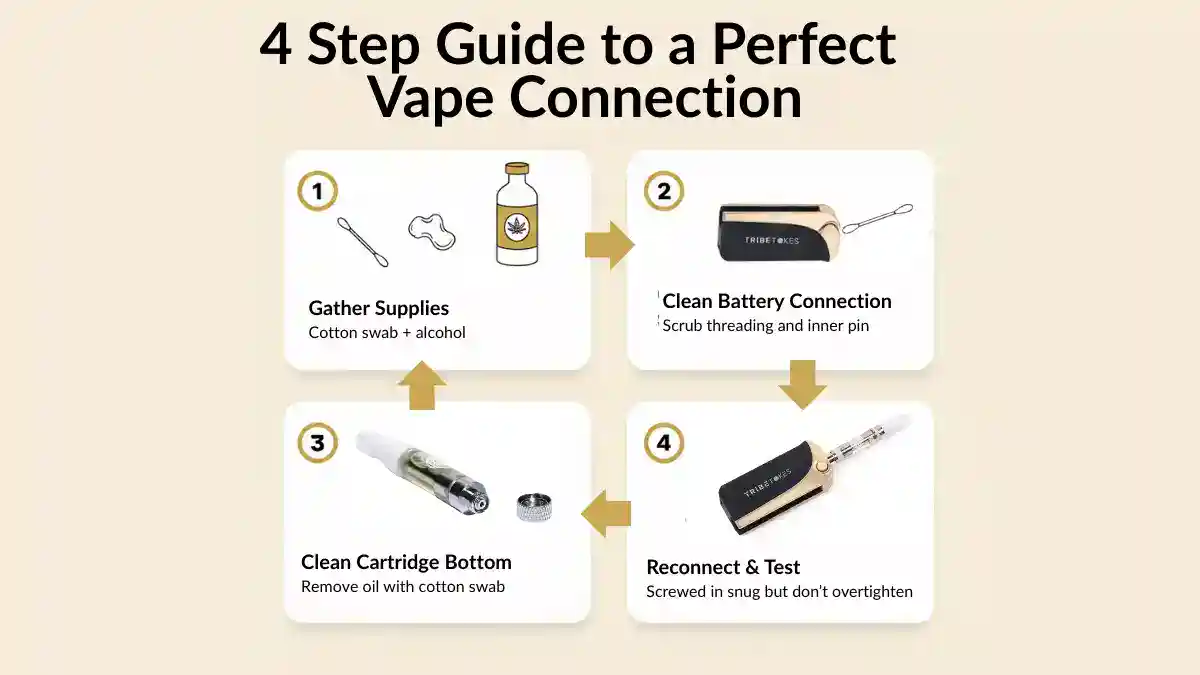
- Turn off your battery and unscrew the cartridge
- Clean the battery connection: Dip a cotton swab in isopropyl alcohol and gently scrub the threaded connector area and the center pin. You’ll likely see oil residue and gunk come off on the swab.
- Clean the cartridge connection: Use a fresh alcohol-soaked swab to clean the bottom of the cartridge where it contacts the battery. Pay special attention to the metal threading and the center contact point.
- Dry completely: Let both pieces air dry for 2-3 minutes. Isopropyl alcohol evaporates quickly, but you want zero moisture before reconnecting.
- Reconnect and test: Screw the cart back onto the battery (hand-tight, not over-tightened) and try again.
⚠️ Important: Don’t over-tighten your cartridge. Hand-tight is enough. Over-tightening can damage the connection, push the center pin down too far, or even crack ceramic cartridges.
How often to clean: Clean your battery connections every 1-2 weeks if you vape daily, or whenever you notice reduced vapor production. Clean cartridge connections whenever you swap carts.
3 Adjust Your Voltage Settings
If your battery has adjustable voltage (like the TribeTokes Saber with its 2.6V-4.2V range or the Wand battery), using the wrong voltage can cause weak hits, burnt taste, or no vapor at all.
Optimal voltage ranges by cart type:
| Cart Type | Recommended Voltage | Why |
| THCa Carts / Live Resin | 2.4V – 2.8V | Low heat preserves delicate terpenes and prevents harsh hits |
| Distillate / Delta 8 Carts | 2.8V – 3.2V | Standard range for thicker oils; balances flavor and vapor |
| CBD Carts | 3.0V – 3.3V | CBD requires slightly higher temps for optimal vaporization |
| Thick/Cold Carts | 3.2V – 3.5V (temporarily) | Use briefly to warm thick oil, then lower to normal range |
How to adjust:
- Start at 2.8V as a baseline for most cannabis carts
- If vapor production is weak, increase by 0.2V increments
- If you taste burning or your throat feels harsh, decrease voltage immediately
- Never exceed 4.0V for cannabis cartridges (4.2V max is only for nicotine vapes)
💡 Pro Tip: Temperature affects your oil’s thickness. If your cart isn’t hitting in cold weather, try the preheat function (available on batteries like the Saber and Wand) or increase voltage by 0.2V-0.4V temporarily to get oil flowing, then return to your preferred setting.
4 Check for a Clogged Airflow
Cannabis oil is thick, especially in cold temperatures. Sometimes oil can clog the narrow airflow path in your cartridge, blocking vapor from reaching your mouth even though the battery is heating properly.
Signs of a clogged cart:
- You hear a sizzling/heating sound but get no vapor
- Very restricted or completely blocked airflow when you try to inhale
- Oil appears to have crystallized or separated in the cart
- Cart worked fine yesterday but won’t hit today (especially if it was in the cold)
How to fix a clogged cartridge:
- Warm the cart gently: Hold it in your hands for 1-2 minutes to warm the oil with body heat, or run warm (not hot) water over the cart body for 30 seconds while keeping the mouthpiece and connection dry.
- Use preheat mode: If your battery has a preheat function (press button 2x rapidly on most models), activate it to gently warm the oil without taking a hit.
- Take primer puffs: Inhale gently through the mouthpiece WITHOUT pressing the button. This creates suction that can help pull oil through the airflow channel.
- Increase voltage briefly: Set to 3.2V-3.5V for 1-2 short hits to get oil flowing, then return to normal voltage.
- Store properly: Keep carts upright in a cool, dry place. Extreme cold causes clogs; extreme heat causes leaks.
⚠️ Never use these methods: Don’t use a microwave, hair dryer, or direct flame to heat your cart. Excessive heat can cause the cart to leak, damage internal components, or even make it explode. Gentle warming only.
5 Inspect the Center Pin Connection
The center pin on your battery (the small metal contact point in the middle of the 510 threading) needs to make contact with the corresponding point on your cartridge. Sometimes this pin gets pushed down too far, preventing connection.
How to check and adjust:
- Unscrew your cartridge and look at the battery’s center pin
- The pin should sit slightly higher than the surrounding threading (about 1-2mm)
- If it’s flush or recessed, you need to adjust it
- To raise a stuck pin: Use a small flathead screwdriver or tweezers to GENTLY pry the center pin upward. Move slowly and carefully – you only need to raise it 1-2mm.
- Test with your cartridge again
⚠️ Be extremely gentle: The center pin is delicate. Too much force can permanently damage your battery. If you’re not comfortable doing this, try the cart on another battery instead, or contact the manufacturer.
6 Test with Another Cart or Battery
This is the fastest way to determine whether your cart or battery is the problem.
Testing process:
- Try your cart on a friend’s battery (or any other 510-threaded battery):
- If the cart works → Your battery is the problem
- If the cart doesn’t work → The cartridge is defective
- Try a different cart on your battery:
- If other carts work → Your original cart is defective
- If no carts work → Your battery needs replacement
When to replace your battery:
- It doesn’t work with any cartridge after cleaning and charging
- The light blinks rapidly (10+ times) or shows unusual patterns
- It smells burnt or shows visible damage
- It’s more than 2 years old and performance has declined
- It won’t hold a charge for more than a few hours
When to replace your cartridge:
- It doesn’t work on any battery
- The oil looks separated, discolored, or crystallized
- You taste burning even at low voltage
- There’s visible damage to the mouthpiece or cartridge housing
- It’s a counterfeit or low-quality cart (always buy from reputable sources like TribeTokes with lab testing)
Common Battery Light Signals & What They Mean
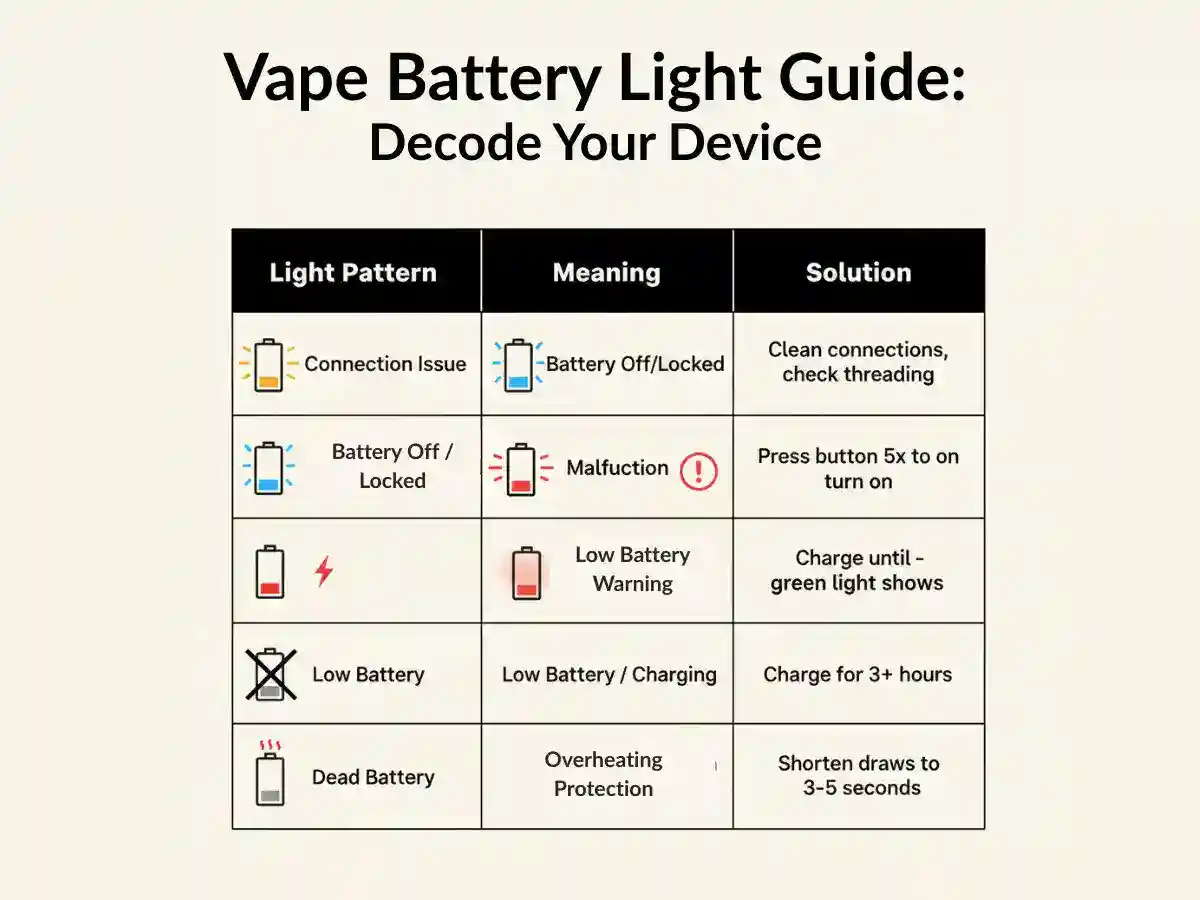
Your battery communicates with you through light patterns. Here’s what they mean:
| Light Pattern | Meaning | What to Do |
| 3 Blinks | Connection issue / Cart not detected | Clean connections, ensure cart is fully screwed in, check center pin |
| 5 Blinks | Battery is off / Activation lock | Press power button 5x rapidly to turn on |
| 10+ Blinks | Short circuit or battery malfunction | Stop using immediately; battery likely needs replacement |
| Red Light | Low battery / Charging in progress | Charge battery; wait for green light indicating full charge |
| No Light | Battery is dead or broken | Charge for 1+ hours; if still no light, battery is dead |
| Rapid Blinking During Hit | Over-heating protection activated | You’re taking too long of a draw; shorten to 3-5 seconds max |
💡 Pro Tip: Every battery brand uses slightly different light patterns. Check your battery’s user manual or the manufacturer’s website for specific light codes. TribeTokes batteries include clear documentation and 1-year warranty support if you run into issues.
Battery-Specific Troubleshooting
TribeTokes Saber Battery
The Saber battery conceals your cart inside the device and features a digital OLED screen with adjustable voltage (2.6V-4.2V).
Saber-specific issues:
- Cart won’t eject: Press the button firmly – you should hear a click and feel the cart pop out. If stuck, don’t force it. Unscrew the top cap to access the cart directly.
- OLED screen is blank: Battery is likely dead. Charge for 2 hours and try again. If screen remains blank after charging, contact TribeTokes support (covered under 1-year warranty).
- Voltage won’t adjust: Press the button 3x rapidly to cycle through voltage settings. Each press should change the display. If not responding, battery may need replacement.
TribeTokes Wand Battery
The Wand battery features a twist-wheel voltage control at the bottom (2.0V-4.0V range).
Wand-specific issues:
- Voltage wheel won’t turn: The wheel should rotate smoothly. If stuck, don’t force it – you may have a defective unit. Contact TribeTokes for warranty replacement.
- Inconsistent hits despite voltage adjustment: Clean the connection points and ensure your cart is fully screwed in. The Wand’s connection is very sensitive to debris.
- Preheat mode not working: Press the button 2x rapidly. You should see the light pulse gently. If nothing happens, battery may need replacement.
TribeTokes Mini Battery
The Mini battery is ultra-compact and uses magnetic adapters instead of threading.
Mini-specific issues:
- Magnetic adapter won’t attach: Make sure you’re using the correct size adapter (small for 1g carts, large for 0.5g carts). The adapter should click firmly onto the cart’s threading.
- Cart keeps falling out: The magnet may be weakening. Try cleaning both the adapter and the battery’s magnetic connection with a dry cotton swab to remove any metal filings or debris.
- Draw-activated not working: The Mini activates when you inhale – no button press needed. If not working, ensure the cart is fully inserted and the magnetic connection is clean. Also verify battery is charged.
How to Prevent Future Problems
Most cart and battery issues are preventable with proper care. Here’s how to keep your setup working smoothly:
Battery Maintenance
- Clean connections weekly: Use isopropyl alcohol and cotton swabs to prevent oil buildup
- Don’t let battery fully drain: Charge when it hits 20-30% rather than waiting for complete depletion. This extends battery lifespan.
- Avoid extreme temperatures: Don’t leave your battery in a hot car or freezing conditions. Ideal storage is 60-75°F.
- Don’t overcharge: Unplug once fully charged (green light). Leaving it plugged in 24/7 degrades the battery faster.
- Use the right charger: Always use the USB cable that came with your battery. Mismatched chargers can damage the battery or create safety hazards.
Cartridge Care
- Store upright: Keep carts vertical to prevent leaking and ensure oil stays near the heating element
- Don’t over-tighten: Hand-tight is sufficient. Over-tightening damages connections and can crack ceramic carts.
- Let oil settle: Wait 15-30 seconds between hits so oil can re-saturate the wick. Chain vaping causes dry hits and burnt taste.
- Use appropriate voltage: Follow the voltage guidelines above. Too high = burnt taste and wasted oil. Too low = weak hits and clogging.
- Buy from reputable sources: Counterfeit carts often have connection issues, poor-quality hardware, and unsafe ingredients. Stick with lab-tested brands like TribeTokes.
💡 Pro Tip: Keep a backup battery and backup cart on hand. Having a spare lets you quickly test whether the issue is your cart or battery, and ensures you’re never stuck with a non-working setup. TribeTokes offers battery bundles that save you $20 compared to buying separately.
When to Replace Your Battery vs Cart
Sometimes troubleshooting reveals you need new hardware. Here’s when to replace versus repair:
Replace Your Battery If:
- It’s over 2 years old and performance has declined significantly
- It won’t hold a charge for more than 2-3 hours of normal use
- The charging port is loose, damaged, or sparking
- Multiple different cartridges won’t work despite cleaning
- The device shows visible damage, burn marks, or smells burnt
- Light patterns indicate malfunction (rapid blinking, unusual colors)
- You’ve had the same cheap gas station battery for 6+ months (these rarely last long)
Recommended replacement: Invest in a quality battery with warranty coverage. The TribeTokes Saber, Wand, and Mini all include 1-year replacement guarantees for normal wear and tear, adjustable voltage for different cart types, and premium construction that lasts 2-3+ years.
Replace Your Cartridge If:
- It doesn’t work on any battery after testing
- The oil is separated, crystallized, or looks/smells off
- You taste burning at any voltage setting
- There’s visible damage to the cartridge housing, mouthpiece, or connection
- It’s from an unknown or untrusted source (no lab testing)
- The airflow is completely blocked and won’t clear even after warming
Always buy lab-tested carts: Every TribeTokes cartridge includes third-party lab testing for potency, heavy metals, residual solvents, pesticides, and microbials. You can view the Certificate of Analysis (COA) for each batch to verify exactly what you’re inhaling.
⚠️ Safety First: Never attempt to refill pre-filled cartridges or use damaged batteries. The risk of leaking, overheating, or battery failure isn’t worth it. When a cart is empty or damaged, dispose of it properly and replace with a new one.
Why Quality Batteries Matter
You can have the cleanest, most potent cannabis oil in the world, but if you’re using a cheap battery, you’re not getting the experience you paid for. Here’s why investing in a quality battery makes a difference:
| Feature | Cheap Battery ($10-15) | Quality Battery ($30-50) |
| Voltage Control | Fixed voltage (often too high), burns oil | Adjustable 2.4V-4.2V for different cart types |
| Battery Life | 3-6 months typical lifespan | 2-3+ years with proper care |
| Connection Quality | Loose threading, frequent connection issues | Precision-engineered 510 threads, reliable connection |
| Safety Features | Minimal protection, overheating risk | Short-circuit protection, auto-shutoff, overheat prevention |
| Warranty | None or 30 days | 1 year replacement guarantee (TribeTokes) |
| Materials | Cheap plastic, non-food-grade metals | Medical-grade materials, no heavy metal leaching |
TribeTokes batteries are designed specifically for cannabis cartridges, with voltage ranges optimized for THC, CBD, Delta 8, and live resin. Every battery includes a 1-year warranty covering normal wear and tear – if anything goes wrong, we replace it.
Popular TribeTokes battery options:
- Saber: Conceals cart inside device, digital OLED display, 2.6V-4.2V range, $49.99
- Wand: Twist-wheel voltage control, preheat mode, 2.0V-4.0V range, $39.99
- Mini: Ultra-compact palm-sized, magnetic adapters, draw-activated, $29.99
All three models are compatible with any standard 510-threaded cartridge and include free shipping + $20 off when bundled with a cart.
Frequently Asked Questions
If your battery light turns on but you’re not getting vapor, the most common causes are dirty connection points, incorrect voltage settings, or a clogged cartridge airflow. Clean both the battery’s 510-thread connector and the cartridge’s contact pin with isopropyl alcohol and a cotton swab. Make sure your voltage is set between 2.4V-3.3V for most carts. If the problem persists, try the cartridge on another battery to determine if the issue is with the cart or battery.
Signs of a broken vape battery include: no lights turning on even after charging, lights flashing in unusual patterns (often 10+ blinks indicating a malfunction), the battery not holding a charge, burn smell or visible damage, or the battery working with some cartridges but not others despite cleaning connections. If your battery exhibits these symptoms and basic troubleshooting doesn’t help, it’s time to replace it.
This usually indicates a voltage compatibility issue or a connection problem specific to one battery. Some cartridges require specific voltage ranges – if one battery is set too high or too low, it won’t vaporize properly. Additionally, the 510-thread connection depth can vary between batteries. Some cartridges have slightly longer or shorter contact pins, causing connection issues with certain batteries. Try adjusting the voltage on the non-working battery to 2.8V-3.2V and ensure the connection is clean and secure.
Gentle warming can help if your cart is clogged due to thick oil or cold temperatures, but never use direct flame or excessive heat. The safest method is to use your battery’s preheat function (if available) or hold the cart in your hands for 1-2 minutes. You can also run it under warm (not hot) water for 30 seconds while keeping the mouthpiece and connection dry. For stubborn clogs, take short primer puffs without activating the battery to help move the oil. Never microwave, use a lighter directly on the cart, or heat it above body temperature as this can damage the cartridge or cause leaking.
To properly clean your 510 battery connection: Turn off and disconnect your battery. Dip a cotton swab in 91% or higher isopropyl alcohol. Gently clean the threaded connector and the center pin on the battery. Remove any visible oil residue, dust, or debris. Let it air dry for 2-3 minutes (alcohol evaporates quickly). Clean the bottom of your cartridge’s connection the same way. Reconnect and test. For best performance, clean connections every 1-2 weeks or whenever you notice reduced vapor production.
Most cannabis cartridges work best between 2.4V-3.3V. Start at 2.8V and adjust based on your cart type: THCa/Live Resin carts: 2.4V-2.8V (low heat preserves terpenes), Distillate/Delta 8 carts: 2.8V-3.2V (standard range for thick oils), CBD carts: 3.0V-3.3V (slightly higher for optimal vaporization), Thick/cold carts: 3.2V-3.5V (use briefly to warm, then lower). If you taste burning or your throat feels harsh, lower the voltage. If vapor production is weak, increase slightly. Never exceed 4.2V as this can burn your oil and damage the cartridge.
Three blinks typically indicate a connection issue between your battery and cartridge. This means the battery doesn’t detect the cartridge properly. Solutions: Make sure the cart is fully screwed in (hand-tight, not over-tightened), clean both the battery and cartridge connections with isopropyl alcohol, check if the cartridge’s center pin is pushed down too far (gently pull it up with tweezers if needed), try the cart on another battery to rule out a defective cartridge, and ensure you’re using a 510-threaded cartridge compatible with your battery.
A quality 510 battery should last 300-500 charge cycles, which translates to 1-2 years with regular use. Factors affecting battery lifespan include: charge frequency (partial charges are better than full drain cycles), voltage settings (higher voltage degrades batteries faster), storage conditions (extreme temperatures shorten lifespan), and build quality (premium batteries like the TribeTokes Saber or Wand last longer than cheap gas station batteries). Signs your battery is nearing end of life include shorter charge duration, taking longer to charge, inconsistent performance, or not holding a charge overnight.
A burnt taste from a full cart usually means your voltage is too high or you’re taking too long of draws. Lower your voltage to 2.4V-2.8V range and take shorter 2-3 second puffs instead of long draws. The burnt taste occurs when the heating element gets too hot and scorches the oil or wick. Other causes include a dry or damaged wick (even in full carts), chain vaping without letting the cart rest between hits (oil needs time to saturate the wick), or using the wrong cart type for your battery. Always wait 15-30 seconds between hits and never exceed 3.5V on cannabis cartridges.
Test the cart on a different battery first – this is the fastest way to identify the problem. If the cart works on another battery, your original battery is the issue. If the cart doesn’t work on any battery, the cartridge is defective. Before buying new equipment: clean all connections thoroughly, check and adjust voltage settings, ensure the cart is genuine (fake carts often have connection issues), and verify your battery is fully charged. If you’ve tried all troubleshooting steps and the cart works on other batteries, invest in a quality replacement battery with adjustable voltage and warranty coverage. Premium batteries like the TribeTokes Saber, Wand, or Mini include 1-year warranties and typically last much longer than budget options.